


I Let Agentic Cortex Run My Life for a Week. Nobody Noticed.
by Albert Ying
16 March 2026
9 min read
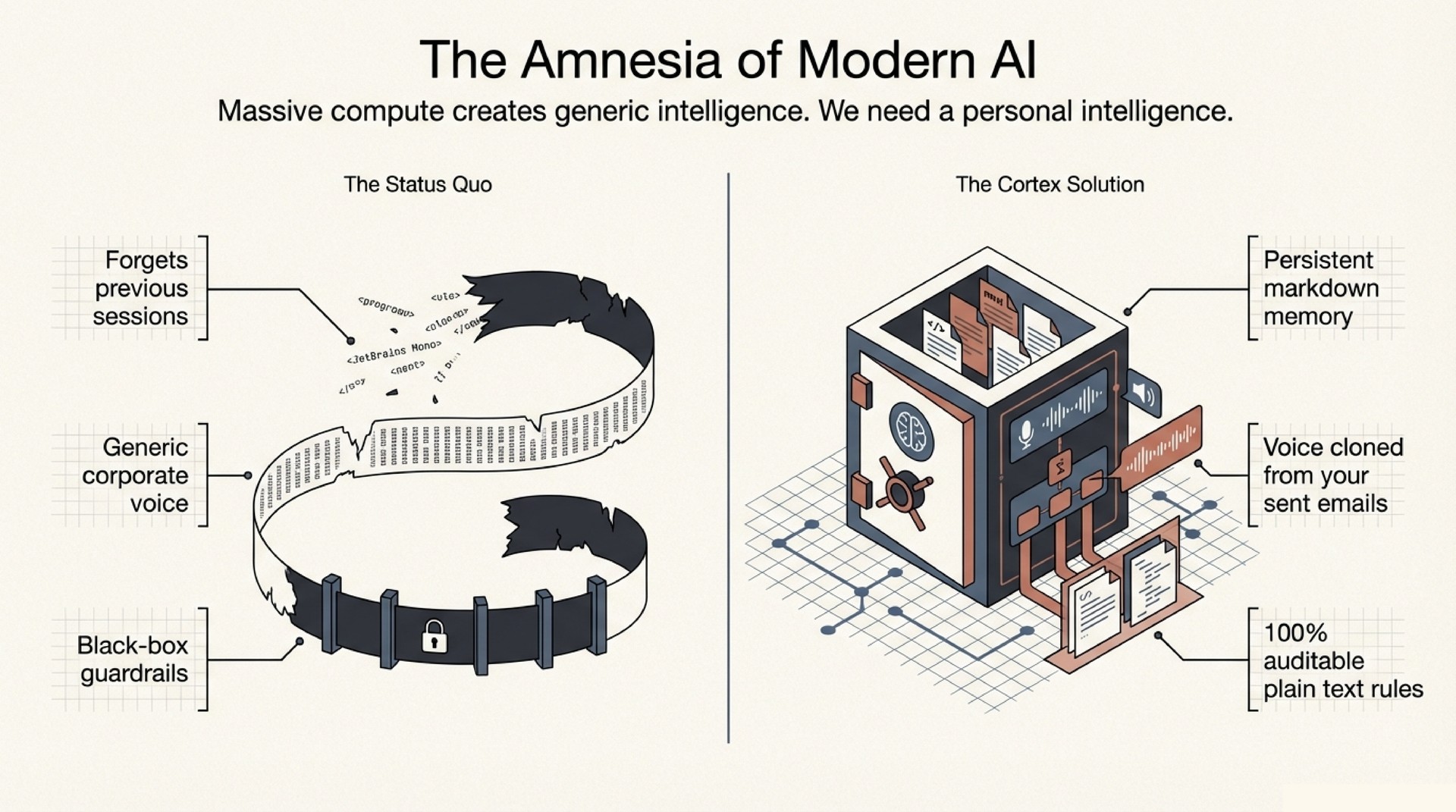
The take-home message is simple. An AI agent that shares your actual memory, writes in your actual voice, and learns from every correction you give it is a different thing from a chatbot with RAG bolted on. It is closer to a second self.
I built this over the past month with Agentic Cortex, an open-source personal AI operating system built for OpenClaw / Claude Code. Last week it drafted 12 emails, ran morning briefings that surfaced stale follow-ups and project momentum, caught a promise I had forgotten three weeks prior, and prepared meeting context before I asked. Nobody on the receiving end flagged anything. The emails sounded like me because the agent had the same memory, the same taste, and the same voice.
This post explains the three technical ideas that make it work. A feedback loop that functions like RLHF without training. Voice profile extraction from real communication history. And ambient context capture via Screenpipe.
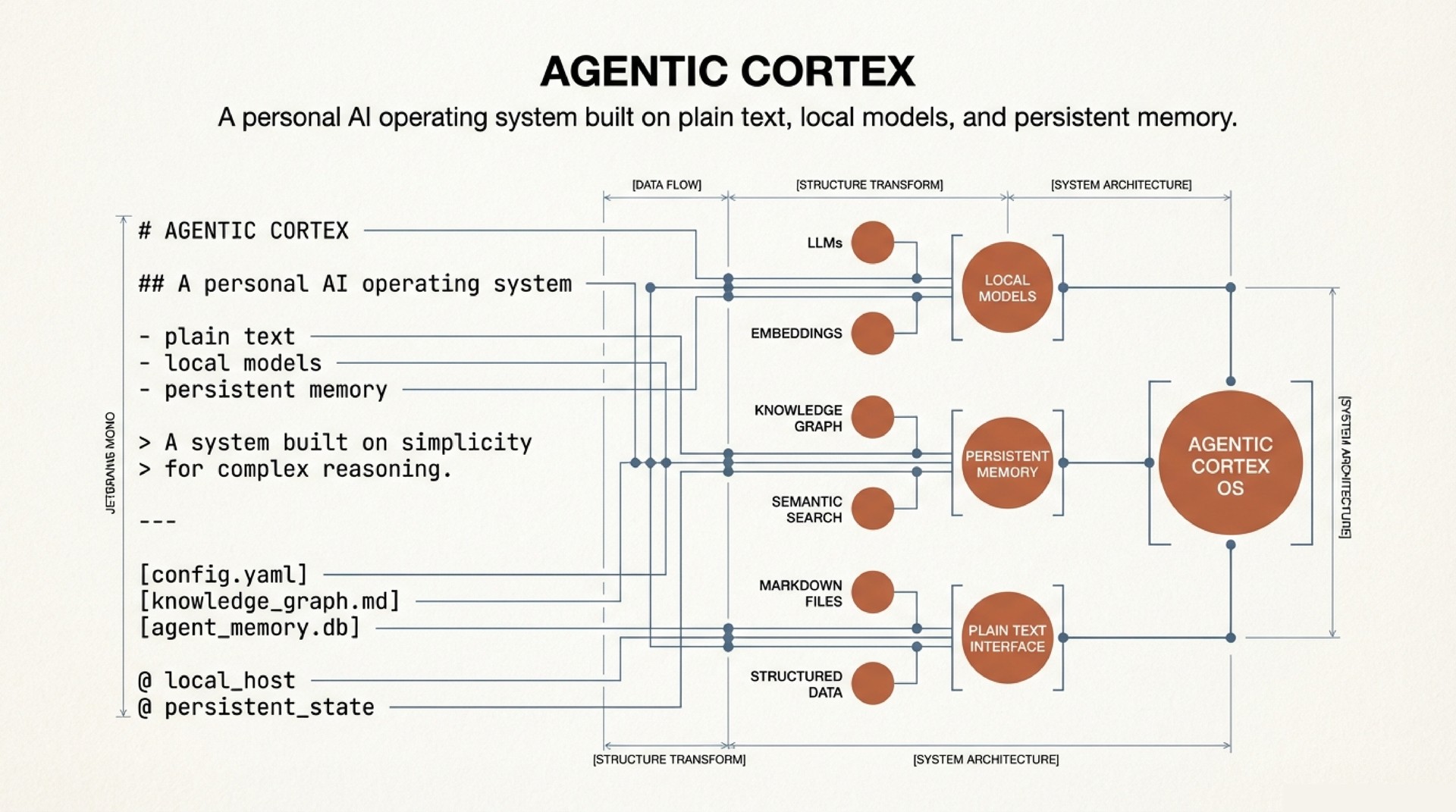
Architecture in Brief
The system is five layers of plaintext markdown, version-controlled in git. No vector database. No embeddings. No fine-tuning.
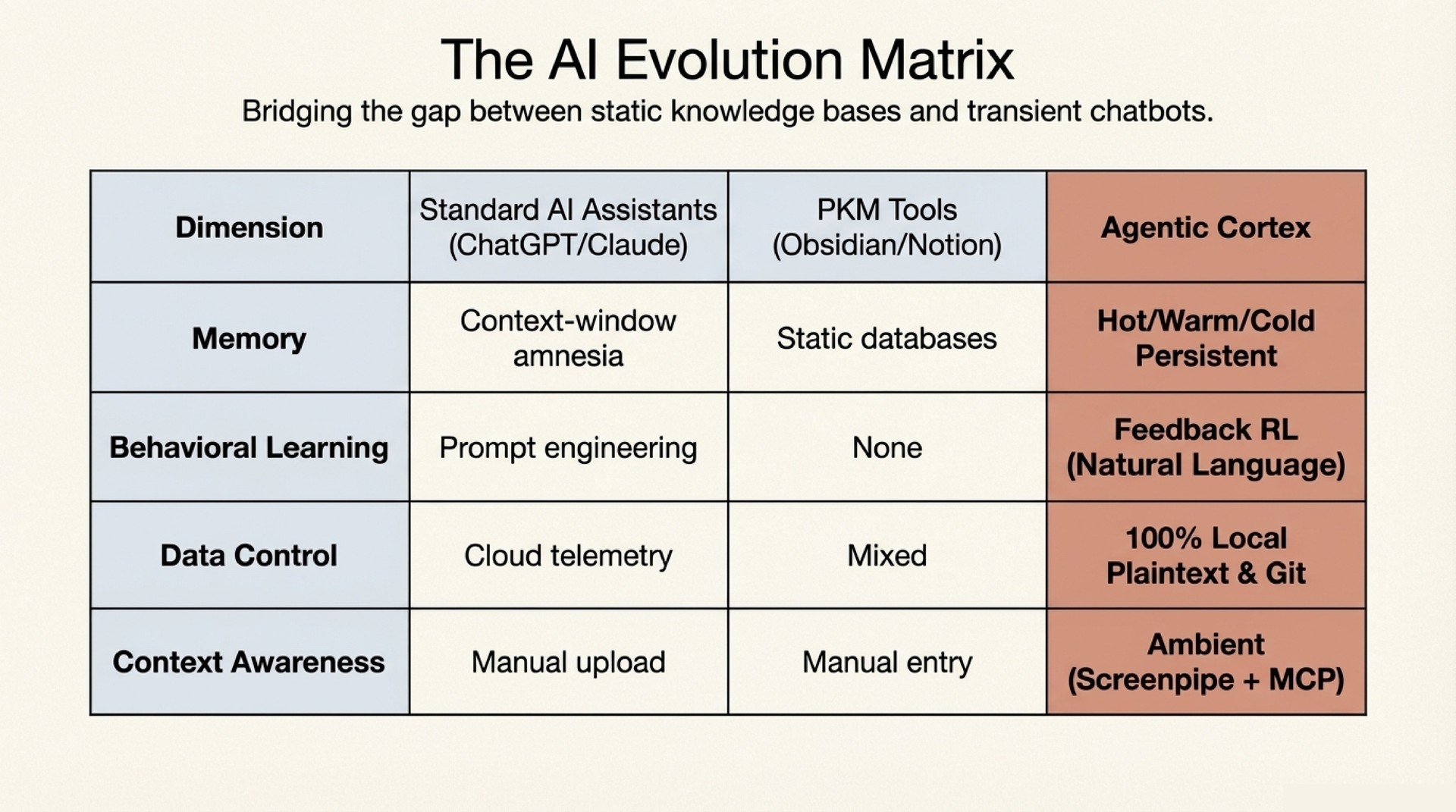
- Senses – MCP servers connecting to Gmail, Google Calendar, and Screenpipe (local screen + audio recording). Read-only data pipes with human approval gates on every action.
- Sync Engine – Source adapters that normalize raw data into structured diffs: new calendar events, email threads with replies, collaborator mentions in transcripts. These flow into the vault.
- Vault – The long-term memory. Dot-separated filenames encode type, time, and relationships. More on this below.
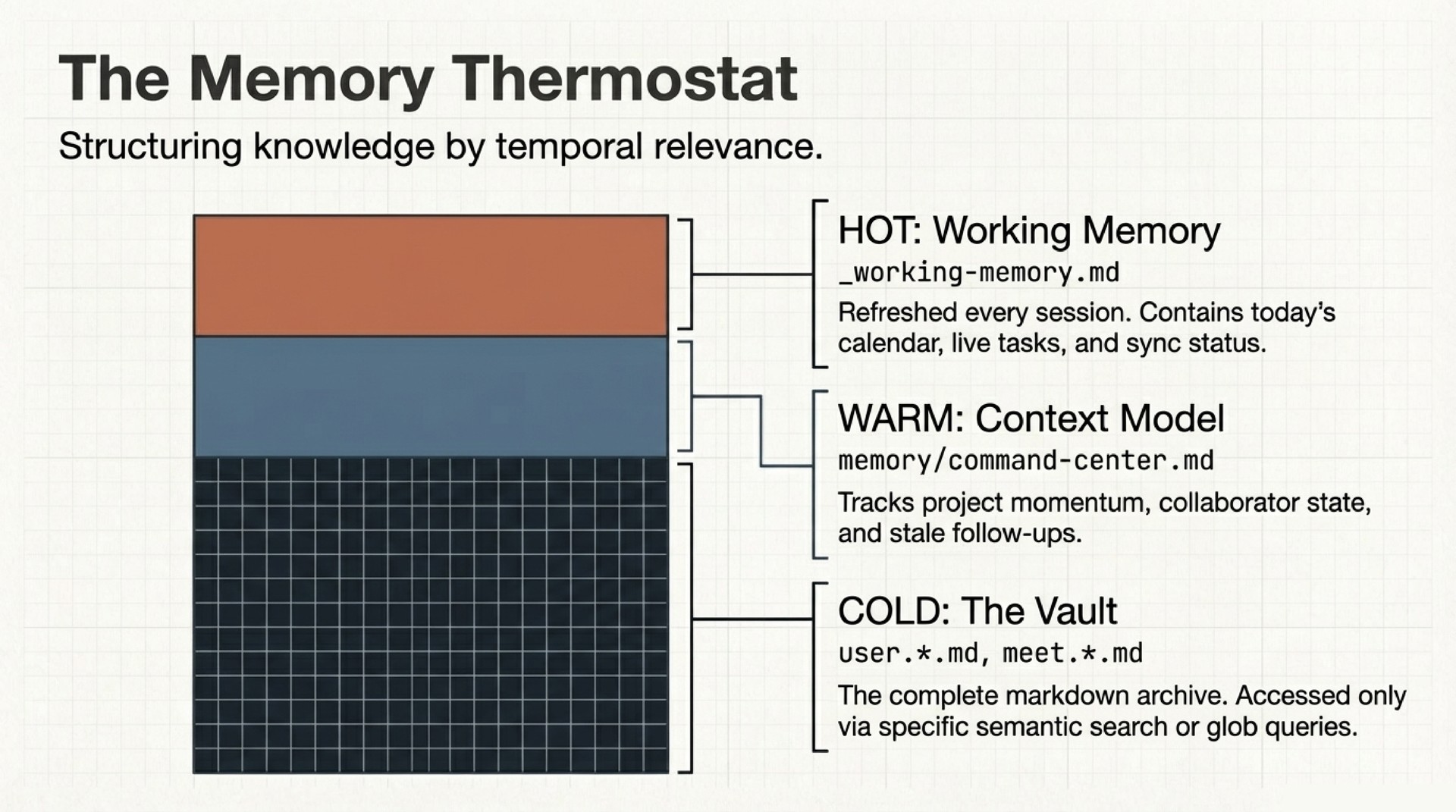
- Command Center – Working memory (
_working-memory.md) tracks what is hot right now: today’s calendar, active tasks, stale follow-ups. A context model tracks medium-term state: project momentum, collaborator threads, open decisions. Three tiers (hot, warm, cold), all plaintext. - Behavior Layer – A
CLAUDE.mdfile defines the agent’s operating rules. Skills provide reusable capabilities. Auto-memory files accumulate learned preferences across sessions. A feedback loop converts corrections into permanent behavioral changes.
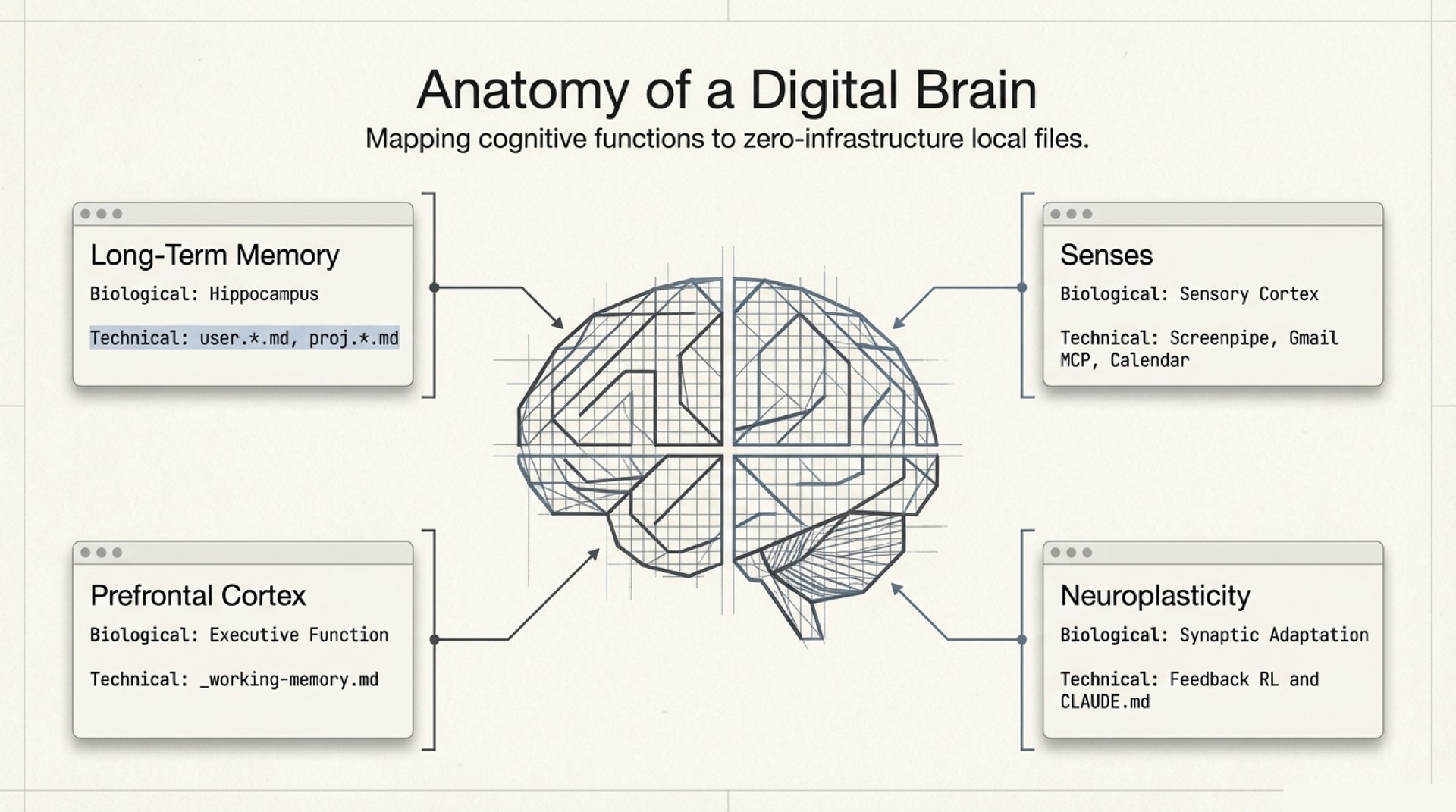
Everything is git diff-able. You can inspect exactly what changed in the agent’s world model between Tuesday and Wednesday. The full architecture is in the repo.
Naming as Schema: The Filesystem is the Knowledge Graph
I think this is the most underappreciated idea in the system. It comes from Dendron, and it is really elegant.
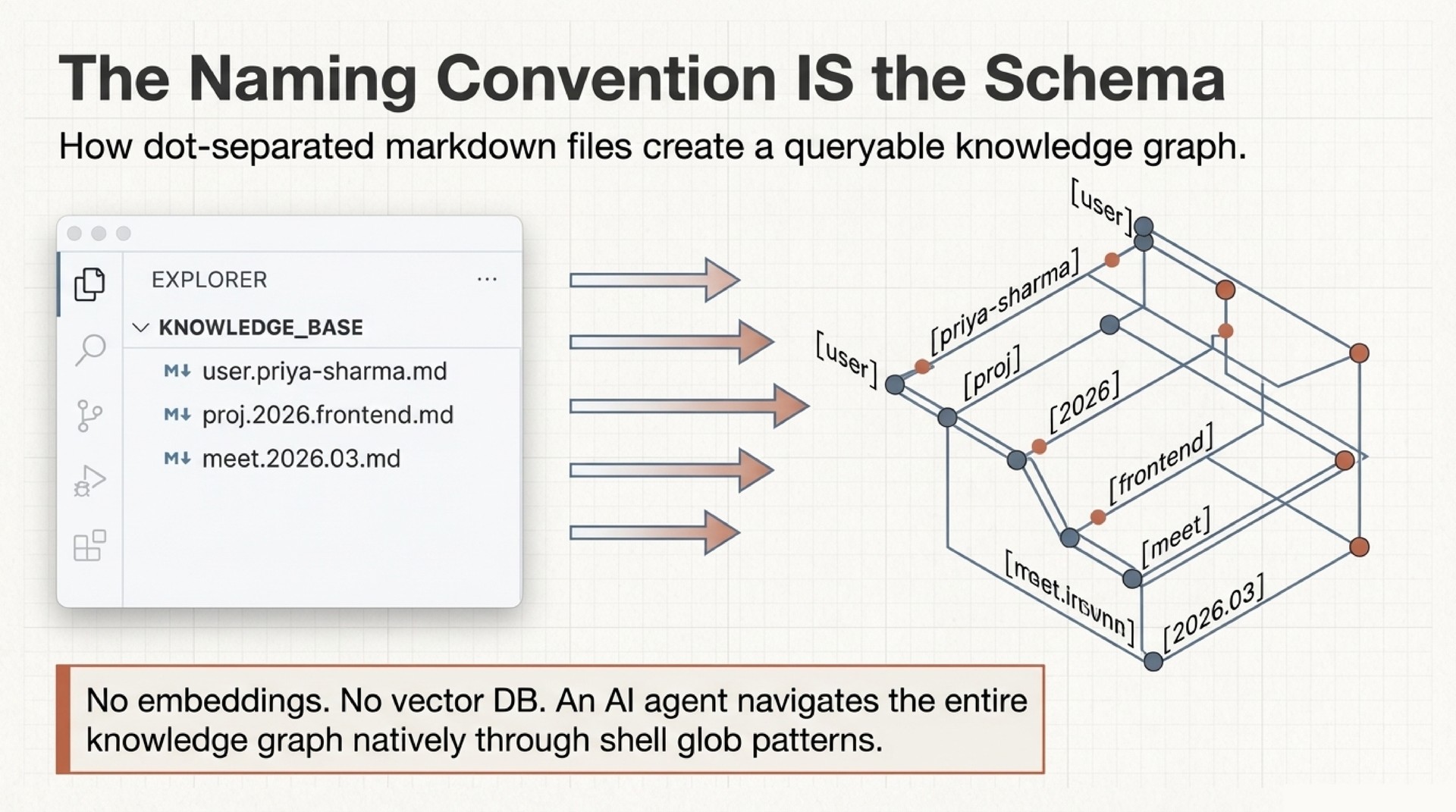
Every file in the vault follows a dot-notation naming convention. user.priya-sharma.md is a person. proj.2026.api-redesign.md is a project. meet.2026.03.14.md is a meeting. daily.journal.2026.03.14.md is that day’s journal. The naming convention IS the schema. No database. No embeddings. No infrastructure.
The agent navigates the entire knowledge graph through glob patterns and grep. user.*.md finds all people. proj.2026.*.md finds all 2026 projects. meet.*.md + grep for a person’s name finds every meeting with that person. Cross-links inside notes create graph edges. The result is a queryable knowledge graph built on nothing but filenames and plaintext.
 A real vault’s note graph. Each cluster is a namespace (user.*, proj.*, daily.*, sci.*). Cross-links between notes create the edges. The naming convention creates this structure – no graph database required.
This works because the dot hierarchy encodes three things simultaneously: type (the first segment), time (dates embedded in the path), and relationships (through cross-links and shared prefixes). A glob pattern like user.*.md is really a typed query. daily.journal.2026.03.*.md is a date-range query. And because every file is just markdown, any tool that can search text can traverse the graph.
The deeper point is that naming conventions are an underrated form of architecture. Most people treat filenames as labels. However, if you treat filenames as structured data, the filesystem itself becomes a database. Dendron understood this years ago. The agent just exploits it.
The Feedback Loop: Behavioral Alignment Through Structured Feedback
This is the most interesting part of the system.
I want to be precise about what this is and what it is not. It is not reinforcement learning. There is no reward function, no policy optimization, no gradient update. The LLM weights never change. However, the mechanism is structurally analogous to RL in an important way: human corrections produce lasting behavioral change that compounds over time. The difference is that the change propagates through context, not through parameters.
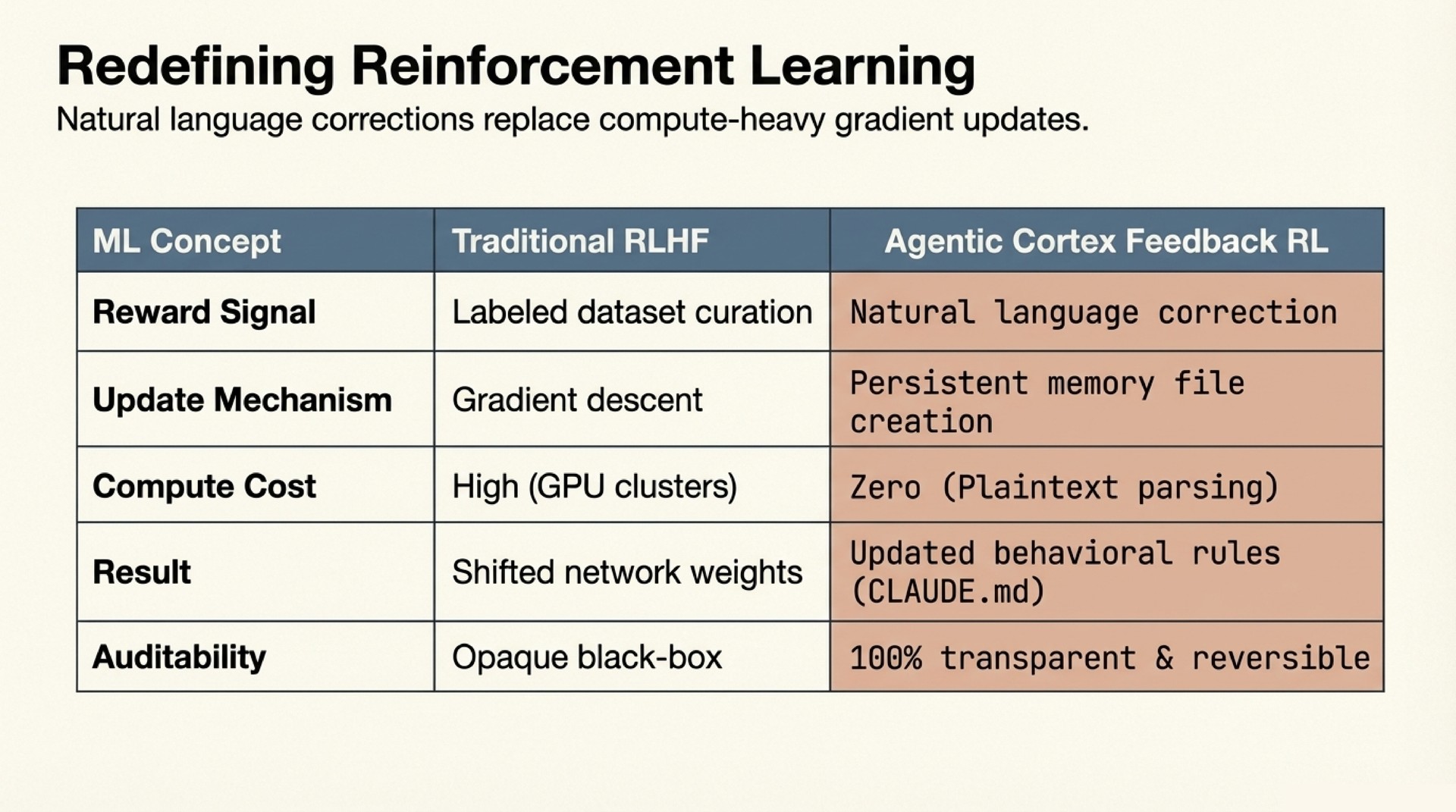
Here is how it works. When I correct the agent (“don’t double-space after paragraphs in emails”), the correction gets persisted as a structured memory entry with three things:
- The rule: single line breaks in all email drafts.
- The rationale: double spacing signals AI-generated text to recipients who know my style.
- The scope: all email drafts, all communication registers.
Next session, the agent reads this file alongside all other accumulated feedback at context-load time. The behavior changes permanently. No training run. No weight update. The prompt evolves; the model stays the same.
The key insight is not that this is RL. It is that structured feedback with rationale enables single-example generalization. In traditional RLHF, you need many labeled examples to shift a model’s distribution. Here, a single correction with a well-articulated rationale generalizes immediately, because the agent can reason about the underlying principle.
One correction about git repositories and large binary files (“never git init at ~/ – a prior .git there ballooned to 52GB from tracking binary-heavy subdirectories”) later caused the agent to independently warn about initializing a repo in a directory full of .h5 files. No rule mentioned .h5 files. The agent extracted the principle (large binary files and git do not mix) and applied it to a novel situation. This is not learning in the ML sense. It is reasoning over structured context. But the practical effect is the same: the behavior improves from feedback and stays improved.
After roughly 15 sessions and 18 accumulated feedback entries, the agent’s email drafts became indistinguishable from my own. The corrections compound. Each one narrows the behavioral space, and because the agent reads all of them at session start, the combined effect is multiplicative.
The final takeaway: the LLM weights never change – the prompt does.
Voice Profile Extraction
An agent that remembers your schedule is useful. An agent that writes like you is transformative.
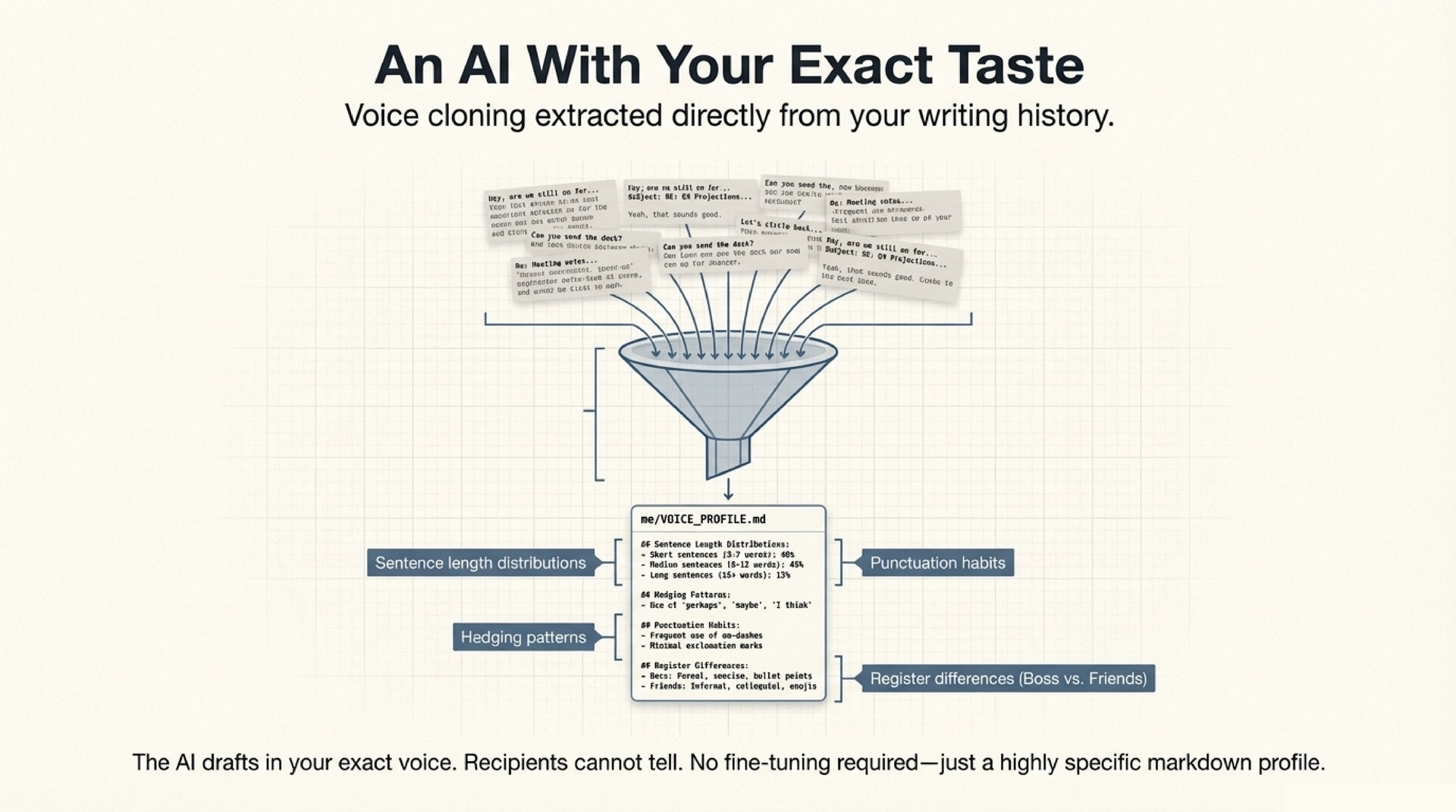
The voice profile is a structured document extracted from real communication data – sent emails, chat messages, meeting notes. The extraction process analyzes thousands of messages across channels, identifying patterns in:
- Register calibration: How formality, warmth, and technical depth shift based on the recipient. An email to an advisor reads differently from a message to a close collaborator. Both read differently from a note to a conference organizer.
- Structural habits: Sentence length distributions, paragraph patterns, greeting and sign-off conventions, topic transitions.
- Vocabulary fingerprint: Domain terms you use versus avoid, filler phrases that signal your voice, characteristic constructions.
- Cross-language patterns: For multilingual users, how you code-switch, which terms stay in which language, how tone shifts across languages.
The resulting document is a detailed specification of how you communicate, organized by register and channel. The agent reads it at session start and applies it to every draft. The first draft is close. The feedback loop handles the remaining delta.
This matters because the failure mode of most AI-drafted communication is not factual error. It is uncanny valley. The email is almost right but uses a greeting you would never use, or structures the ask in a way that is subtly off. Recipients do not consciously notice, but the interaction feels different. A precise voice profile eliminates that gap.
Screenpipe: Ambient Context Without Manual Logging
The weakest link in any personal knowledge system is input. People do not log consistently. They forget to take meeting notes. They do not record what they were working on at 2 AM when an idea struck.
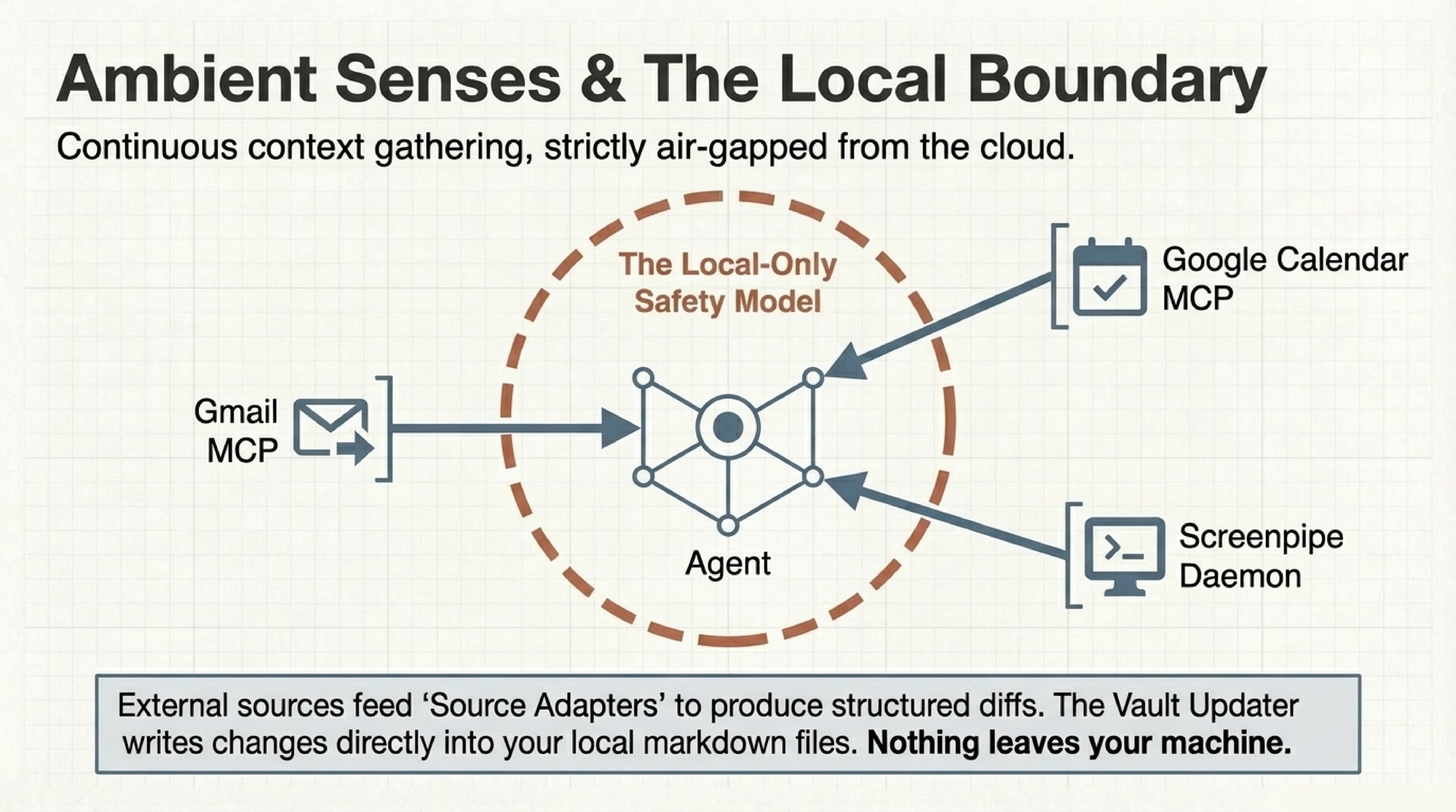
Screenpipe solves this by recording screen content and audio continuously on the local machine. The sync engine queries Screenpipe’s local API, extracts structured events (applications used, documents opened, conversations transcribed), and flows them into the vault.
The practical effect: the agent knows what you were working on yesterday even if you did not tell it. It can reconstruct context from screen recordings, identify when you were deep in a particular codebase, notice that you spent three hours on a paper draft, or flag that a collaborator’s name appeared in a video call transcript. This becomes the raw material for daily journal generation – automated activity logs with key moments preserved as screenshots and clips.
The privacy model is strict. Screenpipe runs entirely locally. Recordings never leave the machine. The agent accesses them through a local API with the same permission gates as every other action. You can delete any recording at any time. The vault entries derived from it remain as standalone notes. The dependency is one-directional.
The Shared Memory Model
Here is the deeper insight beneath all of this. Something qualitatively different happens when an AI agent shares your memory. Not a summary of your memory. Not a retrieval over your memory. Your actual structured knowledge, maintained in the same format you would maintain it yourself.
The agent has the same memory as you. In many cases, more precise memory. It knows when you last contacted each collaborator, what was discussed, what was promised. It tracks 400+ people profiles, each with interaction history, relationship context, and open threads. It maintains project state across months. It catches things you have forgotten because it reads the complete context every session while you, being human, rely on incomplete recall.
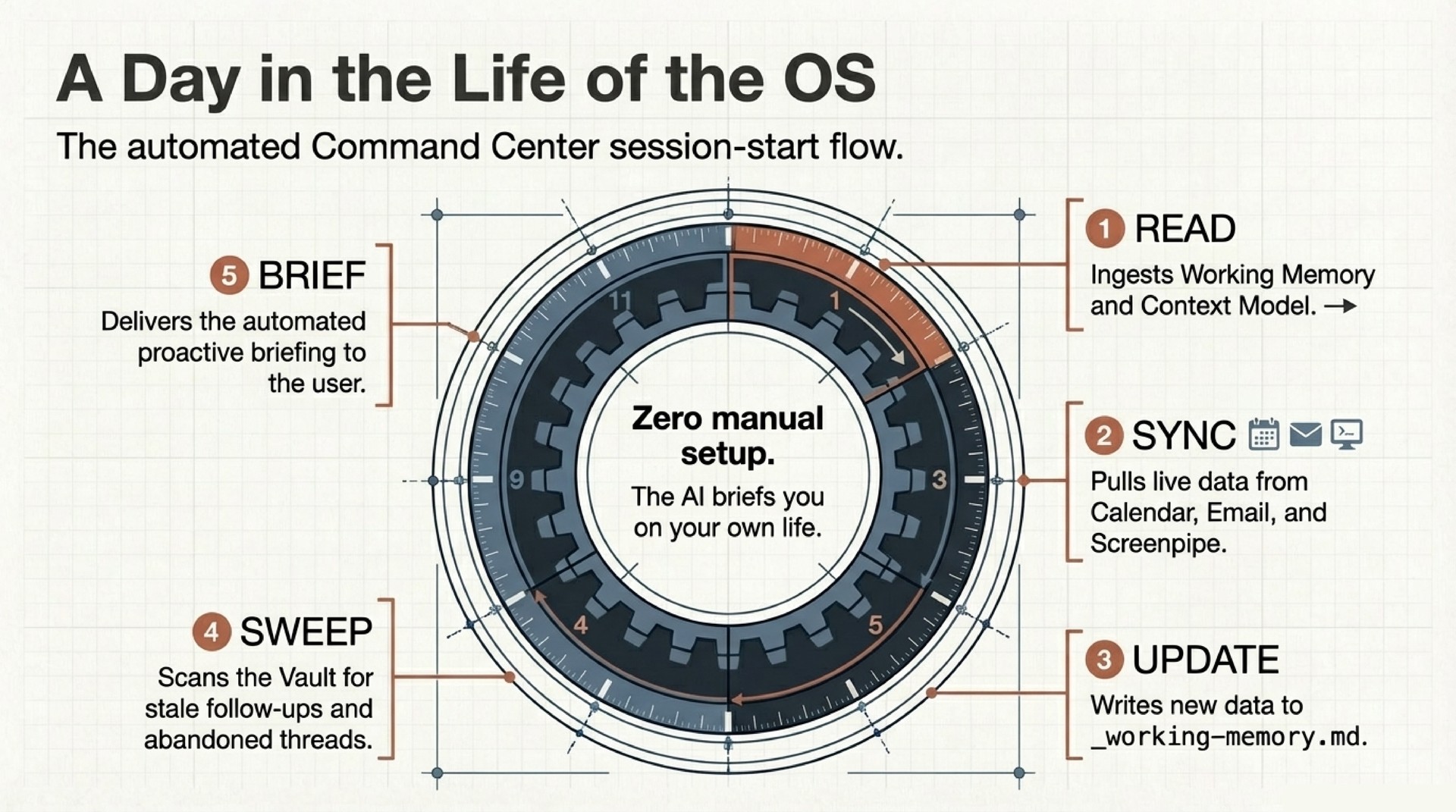
This changes the interaction model. You stop managing the AI and start working with it. The morning briefing is not a feature I configured. It is what naturally happens when an agent has full situational awareness and a directive to surface what matters. The stale follow-up detection is not a reminder system. It is a consequence of the agent knowing your relationship graph and noticing gaps.
Safety
Everything runs locally. The agent drafts emails but never sends them. Chat messages go to the clipboard for manual pasting. Every behavioral rule is a line in a markdown file – delete the line, the behavior stops. The full knowledge base is greppable in seconds. The attack surface is what the agent can read on disk and what you approve it to do. Both are auditable. Both are transparent. The repo documents the threat model in detail.
Try It
The repo includes a seed vault, skills, and a setup script. Clone it, run setup.sh, and you have a working system in 30 minutes. The tutorial walks through nine chapters – from basic persistent memory to the full command center with email, calendar, Screenpipe, voice profiles, and the feedback loop.
The system works with Claude Code, OpenClaw, Cursor, Windsurf, or any agent framework that reads CLAUDE.md and supports MCP. The notes are markdown. The memory is files. The intelligence is whatever model you choose. What matters is the persistent context layer around it.